



SigProfilerExtractor allows de novo extraction of mutational signatures from data generated in a matrix format. The tool identifies the number of operative mutational signatures, their activities in each sample, and the probability for each signature to cause a specific mutation type in a cancer sample. The tool makes use of SigProfilerMatrixGenerator and SigProfilerPlotting.
Prefer not to write code? SigProfilerExtractor also has a graphical interface, the SigProfilerExtractor Workbench: double-click to install and start it on macOS or Windows, set up a run in your browser, and explore the results in an interactive dashboard. It also runs on a Linux server or SLURM cluster, used from the browser on your own computer. See Graphical interface.
Full documentation is available in docs/ (rendered via MkDocs): https://sigprofilersuite.github.io/SigProfilerExtractor/
- Installation
- Graphical interface (Workbench)
- Functions
- Video Tutorials
- Citation
- Copyright
- Contact Information
To install the current version of this Github repo, git clone this repo or download the zip file. Unzip the contents of SigProfilerExtractor-master.zip or the zip file of a corresponding branch.
In the command line, please run the following:
$ cd SigProfilerExtractor-master
$ pip install .
For most recent stable pypi version of this tool, In the command line, please run the following:
$ pip install SigProfilerExtractorInstall your desired reference genome from the command line/terminal as follows (available reference genomes are: GRCh37, GRCh38, mm9, and mm10):
$ python
from SigProfilerMatrixGenerator import install as genInstall
genInstall.install('GRCh37')
This will install the human 37 assembly as a reference genome. You may install as many genomes as you wish.
Next, open a python interpreter and import the SigProfilerExtractor module. Please see the examples of the functions.
The Workbench runs SigProfilerExtractor from your browser, without writing code. It runs entirely on your own computer: your data never leaves it. To run it on a server or cluster instead, see On a server or cluster.
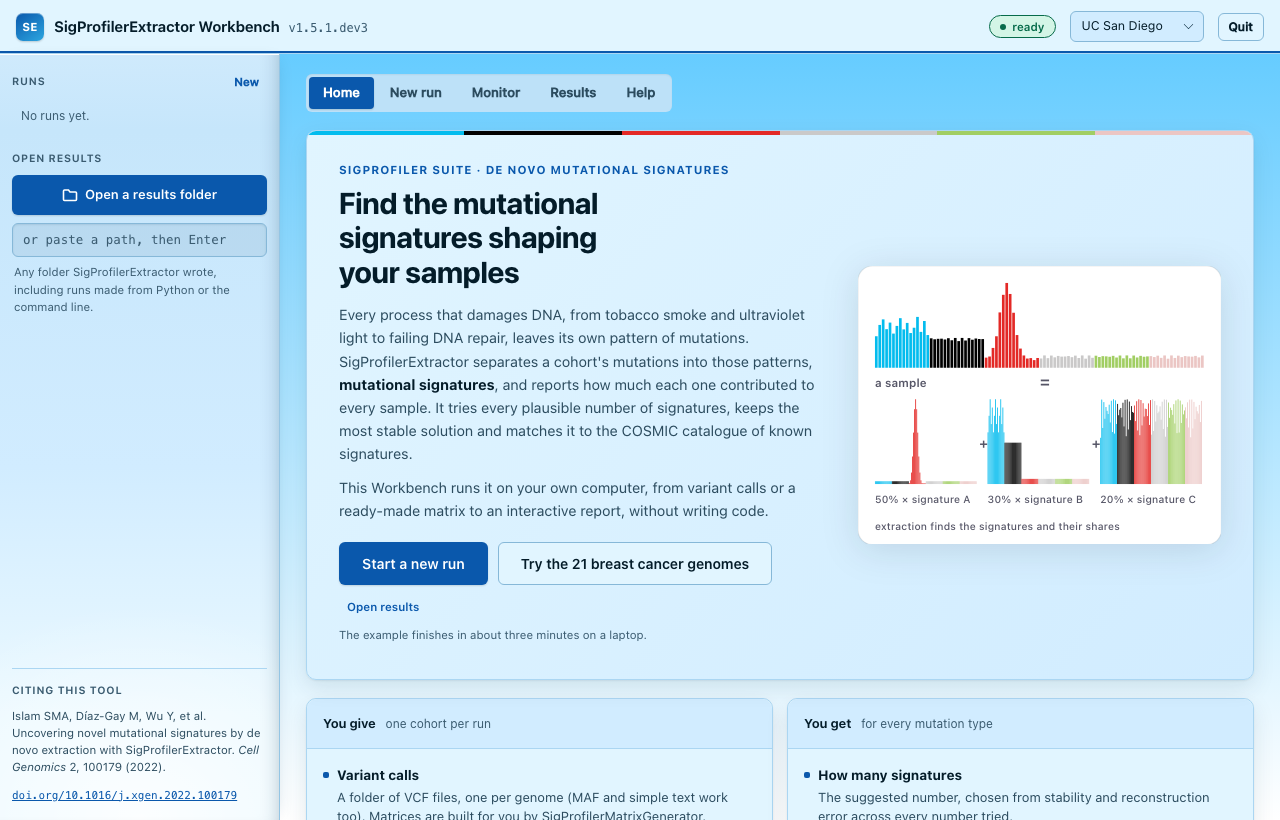
- Any input SigProfilerExtractor takes: a folder of VCF files (matrices are built for you), a mutation matrix (SBS, DBS, ID, CNV or SV), structural variants (BEDPE) or copy-number segments. Each input is checked before anything runs.
- Clear settings: a Quick look preset (a few minutes) and the published Standard setting, a live estimate of the work, every other parameter under Advanced with its default, and bundled examples to try with one click.
- Live progress for each mutation type: the number of signatures being tried, the replicate, the COSMIC step and the time left.
- Results: the suggested solution for each mutation type; how each de novo signature
splits into COSMIC signatures and its closest COSMIC signature by cosine similarity;
SigProfilerExtractor's interactive dashboard (
reports.html); every PDF plot and every table. - The same results as code: it calls the same function as Python and the command line, with the same defaults, and writes the same files.
Download or clone this repository, then double-click the launcher in its folder:
| System | Start | Uninstall |
|---|---|---|
| macOS | launch_web.command |
uninstall_web.command |
| Windows | launch_web.bat |
uninstall_web.bat |
| Linux | ./launch_web.sh in a terminal |
./uninstall_web.sh |
- The only requirement is Python 3.10 or newer (python.org).
The Python that comes with macOS (
/usr/bin/python3, version 3.9) is too old; the launcher finds a newer one installed beside it, or says what to install. - The first start creates a private Python environment,
.venv-dashboard, inside this folder and installs SigProfilerExtractor into it. This takes a few minutes (PyTorch is large) and happens once. Nothing is installed anywhere else on the computer. - The Workbench then opens in your browser. Quit, in its top bar, stops it.
- macOS may say it cannot verify the file the first time: right-click it and choose Open. On Windows, if SmartScreen appears, click More info, then Run anyway.
If SigProfilerExtractor is already installed with pip, SigProfilerExtractor web (or
sigprofilerextractor-web) starts the Workbench from that installation instead.
Click Quit in the Workbench, then double-click uninstall_web.command (macOS) or
uninstall_web.bat (Windows). It lists what it will remove and asks first. It removes
the Workbench's Python environment (including any reference genome installed through the
Workbench) and its run records. It keeps your results and this folder; delete those
yourself if you no longer need them.
To run the Workbench on a Linux server or a SLURM cluster and use it from the browser on your own computer, with no admin rights, Docker or system Python needed:
git clone -b workbench-server https://github.com/SigProfilerSuite/SigProfilerExtractor.git
cd SigProfilerExtractor/server
./spe-server start     # runs it on this machine
./spe-server submit    # or, from a cluster's login node: runs it as a SLURM job
start runs the Workbench on the machine you are logged in to (a lab workstation, a
cloud VM, an interactive session on a compute node), in the background until you stop it.
submit is for a cluster: from the login node it submits a SLURM job, so the Workbench
runs on a compute node with its own CPUs, memory and GPU until the job's time limit
(./spe-server submit --gpus 1 --cpus 32 --memory 128G --time 2-00:00:00). Either way it
installs everything (about 8 GB, with PyTorch) into spe-data beside the clone, or the
folder given with --data, and prints a link with a token: keep it private.
On a server the Workbench draws its own file browser for the server's folders, can upload inputs from your computer, and offers each results folder as one .zip.
| Command | What it does |
|---|---|
./spe-server start |
Start it and print the link (the first time, it installs) |
./spe-server submit |
Run it as a SLURM job instead |
./spe-server url |
Print the link and the SSH tunnel command again |
./spe-server status |
Is it running? (a job: where, and the time left) |
./spe-server logs |
Follow its log |
./spe-server stop |
Stop it, and any run in progress (a job: cancel it) |
./spe-server update |
Reinstall from the clone and restart (git pull first) |
./spe-server new-token |
New link; the old one stops working |
Opening the link from off campus (SSH tunnel), every option, SLURM settings and troubleshooting: server/README.md, also on the documentation site.
The Workbench guide covers every screen in detail.
The list of available functions are:
- importdata
- sigProfilerExtractor
- estimate_solution
- decompose
And an additional script:
- plotActivity.py
Imports the path of example data.
importdata(datatype="matrix")from SigProfilerExtractor import sigpro as sig
path_to_example_table = sig.importdata("matrix")
data = path_to_example_table
# This "data" variable can be used as a parameter of the "project" argument of the sigProfilerExtractor function.
# To get help on the parameters and outputs of the "importdata" function, please use the following:
help(sig.importdata)Extracts mutational signatures from an array of samples.
sigProfilerExtractor(input_type, out_put, input_data, reference_genome="GRCh37", opportunity_genome = "GRCh37", cosmic_version=3.6, context_type = "default", exome = False,
                         minimum_signatures=1, maximum_signatures=25, nmf_replicates=100, resample = True, batch_size=1, cpu=-1, gpu=False,
                         nmf_init="random", precision= "single", matrix_normalization= "gmm", seeds= "random",
                         min_nmf_iterations= 10000, max_nmf_iterations=1000000, nmf_test_conv= 10000, nmf_tolerance= 1e-15,
get_all_signature_matrices=False, make_dashboard=True)| Category | Parameter | Variable Type | Parameter Description |
|---|---|---|---|
| Input Data | |||
| input_type | String | The type of input:
|
|
| output | String | The name of the output folder. The output folder will be generated in the current working directory. | |
| input_data | String | Path to input folder for input_type:
|
|
| reference_genome | String | The name of the reference genome (default: "GRCh37"). This parameter is applicable only if the input_type is "vcf". |
|
| opportunity_genome | String | The build or version of the reference genome for the reference signatures (default: "GRCh37"). When the input_type is "vcf", the opportunity_genome automatically matches the input reference genome value. Only the genomes available in COSMIC are supported (GRCh37, GRCh38, mm9, mm10, mm39, rn6, and rn7). If a different opportunity genome is selected, the default genome GRCh37 will be used. |
|
| context_type | String | Mutation context name(s), separated by commas (,), that define the mutational contexts for signature extraction (default: "96,DINUC,ID"). In the default value, 96 represents the SBS96 context, DINUC represents the dinucleotide context, and ID represents the indel context. |
|
| exome | Boolean | Defines if the exomes will be extracted (default: False). |
|
| NMF Replicates | |||
| minimum_signatures | Positive Integer | The minimum number of signatures to be extracted (default: 1). |
|
| maximum_signatures | Positive Integer | The maximum number of signatures to be extracted (default: 25). |
|
| nmf_replicates | Positive Integer | The number of iteration to be performed to extract each number signature (default: 100). |
|
| resample | Boolean | If True, add poisson noise to samples by resampling (default: True). |
|
| seeds | String | Ensures reproducible NMF resampling and initialization. Provide the path to a Seeds.txt file containing exactly one root seed in the Seed column (the file generated by a previous analysis can be reused) to reproduce results (default: "random"). |
|
| NMF Engines | |||
| matrix_normalization | String | Method of normalizing the genome matrix before it is analyzed by NMF (default: "gmm"). Options are "100X", "log2", "none", or a positive integer used as a manual cutoff (for example 5000). |
|
| nmf_init | String | The initialization algorithm for W and H matrix of NMF (default: "random"). Options are "random", "nndsvd", "nndsvda", "nndsvdar" and "nndsvd_min". |
|
| precision | String | Values should be single or double (default: "single"). |
|
| min_nmf_iterations | Integer | Value defines the minimum number of iterations to be completed before NMF converges (default: 10000). |
|
| max_nmf_iterations | Integer | Value defines the maximum number of iterations to be completed before NMF converges (default: 1000000). |
|
| nmf_test_conv | Integer | Value defines the number number of iterations to done between checking next convergence (default: 10000). |
|
| nmf_tolerance | Float | Value defines the tolerance to achieve to converge (default: 1e-15). |
|
| Execution | |||
| cpu | Integer | The number of processors to be used to extract the signatures (default: all processors). | |
| assignment_cpu | Integer | Number of processors to be used by SigProfilerAssignment for the final signature assignment step (default: all available). This is independent of the cpu parameter. |
|
| gpu | Boolean | Defines if the GPU resource will used if available (default: False). If True, the GPU resources will be used in the computation. Note: All available CPU processors are used by default, which may cause a memory error. This error can be resolved by reducing the number of CPU processes through the cpu parameter. |
|
| batch_size | Integer | Effective only when the GPU is used. Defines how many NMF replicates are grouped into each GPU batch (default: 1). Every replicate has its own resampling and initialization generators, sample totals, and convergence stopping point, whether it runs alone or in a batch. |
|
| Solution Estimation Thresholds | |||
| stability | Float | The cutoff thresh-hold of the average stability (default: 0.8). Solutions with average stabilities below this thresh-hold will not be considered. |
|
| min_stability | Float | The cutoff thresh-hold of the minimum stability (default: 0.2). Solutions with minimum stabilities below this thresh-hold will not be considered. |
|
| combined_stability | Float | The cutoff thresh-hold of the combined stability (sum of average and minimum stability) (default: 1.0). Solutions with combined stabilities below this thresh-hold will not be considered. |
|
| allow_stability_drop | Boolean | Defines if solutions with a drop in stability with respect to the highest stable number of signatures will be considered (default: False). |
|
| Decomposition | |||
| cosmic_version | Float | Defines the version of the COSMIC reference signatures (default: 3.6). Takes a positive float among 1, 2, 3, 3.1, 3.2, 3.3, 3.4, 3.5, and 3.6. |
|
| make_decomposition_plots | Boolean | Generate de novo to COSMIC signature decomposition plots as part of the results (default: True). Set to False to skip generating these plots. |
|
| collapse_to_SBS96 | Boolean | If True, SBS288 and SBS1536 de novo signatures will be mapped to SBS96 reference signatures (default: True). If False, those will be mapped to reference signatures of the same context. |
|
| Others | |||
| get_all_signature_matrices | Boolean | Write to output Ws and Hs from all the NMF iterations (default: False) |
|
| export_probabilities | Boolean | Create the probability matrix (default: True). |
|
| make_dashboard | Boolean | Create the self-contained interactive reports.html after all extraction and assignment steps complete (default: True). Set to False to skip dashboard generation. |
|
| volume | String | Path to the volume for writing and loading reference genomes, plotting templates, and COSMIC signature plots (default: None). Environmental variables take precedence: SIGPROFILERMATRIXGENERATOR_VOLUME, SIGPROFILERPLOTTING_VOLUME, and SIGPROFILERASSIGNMENT_VOLUME. |
For an existing completed output directory, generate or refresh the dashboard without rerunning extraction:
from SigProfilerExtractor.dashboard import create_dashboard

create_dashboard("results")VCF Files as Input
from SigProfilerExtractor import sigpro as sig
def main_function():
    # to get input from vcf files
    path_to_example_folder_containing_vcf_files = sig.importdata("vcf")
    # you can put the path to your folder containing the vcf samples
    data = path_to_example_folder_containing_vcf_files
    sig.sigProfilerExtractor("vcf", "example_output", data, minimum_signatures=1, maximum_signatures=3)
if __name__=="__main__":
   main_function()
# Wait until the excecution is finished. The process may a couple of hours based on the size of the data.
# Check the current working directory for the "example_output" folder.
Matrix File as Input
from SigProfilerExtractor import sigpro as sig
def main_function():
   # to get input from table format (mutation catalog matrix)
   path_to_example_table = sig.importdata("matrix")
   data = path_to_example_table # you can put the path to your tab delimited file containing the mutational catalog matrix/table
   sig.sigProfilerExtractor("matrix", "example_output", data, opportunity_genome="GRCh38", minimum_signatures=1, maximum_signatures=3)
if __name__=="__main__":
main_function()To learn about the output, see docs/output.md.
Estimate the optimum solution (rank) among different number of solutions (ranks).
estimate_solution(base_csvfile="All_solutions_stat.csv",
          All_solution="All_Solutions",
          genomes="Samples.txt",
          output="results",
          title="Selection_Plot",
          stability=0.8,
          min_stability=0.2,
          combined_stability=1.0,
          allow_stability_drop=False,
exome=False)| Parameter | Variable Type | Parameter Description |
|---|---|---|
| base_csvfile | String | Default is "All_solutions_stat.csv". Path to a CSV file that contains the statistics of all solutions. |
| All_solution | String | Default is "All_Solutions". Path to a folder that contains the results of all solutions. |
| genomes | String | Default is "Samples.txt". Path to a tab delimilted file that contains the mutation counts for all genomes given to different mutation types. |
| output | String | Default is "results". Path to the output folder. |
| title | String | Default is "Selection_Plot". This sets the title of the selection_plot.pdf |
| stability | Float | Default is 0.8. The cutoff thresh-hold of the average stability. Solutions with average stabilities below this thresh-hold will not be considered. |
| min_stability | Float | Default is 0.2. The cutoff thresh-hold of the minimum stability. Solutions with minimum stabilities below this thresh-hold will not be considered. |
| combined_stability | Float | Default is 1.0. The cutoff thresh-hold of the combined stability (sum of average and minimum stability). Solutions with combined stabilities below this thresh-hold will not be considered. |
| allow_stability_drop | Boolean | Default is False. Defines if solutions with a drop in stability with respect to the highest stable number of signatures will be considered. |
| exome | Boolean | Default is False. Defines if exomes samples are used. |
from SigProfilerExtractor import estimate_best_solution as ebs
ebs.estimate_solution(base_csvfile="All_solutions_stat.csv",
          All_solution="All_Solutions",
          genomes="Samples.txt",
          output="results",
          title="Selection_Plot",
          stability=0.8,
          min_stability=0.2,
          combined_stability=1.0,
          allow_stability_drop=False,
exome=False)The files below will be generated in the output folder:
| File Name | Description |
|---|---|
| All_solutions_stat.csv | A csv file that contains the statistics of all solutions. |
| selection_plot.pdf | A plot that depict the Stability and Mean Sample Cosine Distance for different solutions. |
For decomposition of de novo signatures please use SigProfilerAssignment
Generates a stacked bar plot showing activities in individuals
plotActivity(activity_file, output_file = "Activity_in_samples.pdf", bin_size = 50, log = False)| Parameter | Variable Type | Parameter Description |
|---|---|---|
| activity_file | String | The standard output activity file showing the number of, or percentage of mutations attributed to each sample. The row names should be samples while the column names should be signatures. |
| output_file | String | The path and full name of the output pdf file, including ".pdf" |
| bin_size | Integer | Number of samples plotted per page, recommended: 50 |
$ python plotActivity.py 50 sig_attribution_sample.txt test_out.pdfTake a look at our video tutorials for step-by-step instructions on how to install and run SigProfilerExtractor on Amazon Web Services.
If CUDA out of memory exceptions occur, it will be necessary to reduce the number of CPU processes used (the cpu parameter).
Islam SMA, Díaz-Gay M, Wu Y, Barnes M, Vangara R, Bergstrom EN, He Y, Vella M, Wang J, Teague JW, Clapham P, Moody S, Senkin S, Li YR, Riva L, Zhang T, Gruber AJ, Steele CD, Otlu B, Khandekar A, Abbasi A, Humphreys L, Syulyukina N, Brady SW, Alexandrov BS, Pillay N, Zhang J, Adams DJ, Martincorena I, Wedge DC, Landi MT, Brennan P, Stratton MR, Rozen SG, and Alexandrov LB (2022) Uncovering novel mutational signatures by de novo extraction with SigProfilerExtractor. Cell Genomics. doi: 10.1016/j.xgen.2022.100179.
This software and its documentation are copyright 2018 as a part of the sigProfiler project. The SigProfilerExtractor framework is free software and is distributed in the hope that it will be useful, but WITHOUT ANY WARRANTY; without even the implied warranty of MERCHANTABILITY or FITNESS FOR A PARTICULAR PURPOSE. See the GNU General Public License for more details.
Please address any queries or bug reports to Mark Barnes at mdbarnes@ucsd.edu