



Mini EQ is a small system-wide parametric equalizer for PipeWire desktops. It uses GTK/Libadwaita for the UI, pipewire-gobject for app-facing PipeWire routing, metadata, and monitor streams, and PipeWire filter-chain with builtin biquad filters for the equalizer. When libebur128 is available, the monitor can also show live LUFS loudness.
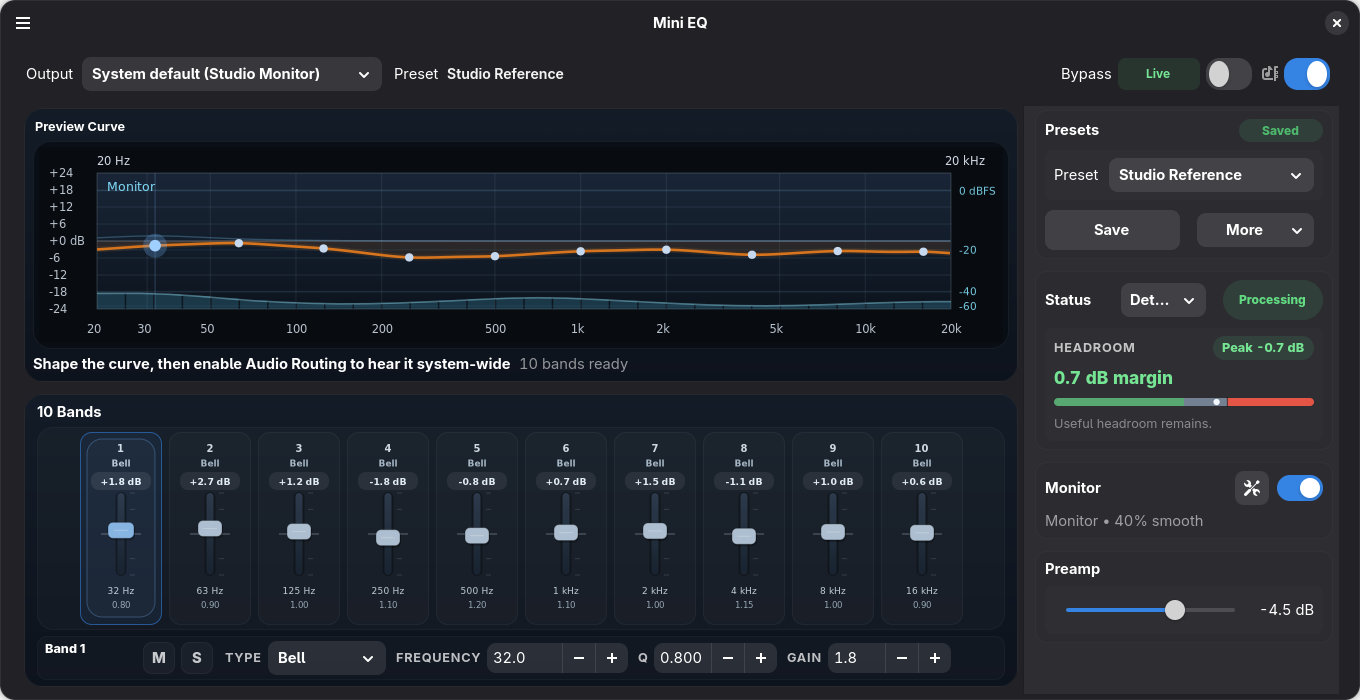
- System-wide parametric EQ for PipeWire desktop playback.
- GTK/Libadwaita interface with a compact 10-band fader workflow.
- PipeWire routing and default-output tracking through pipewire-gobject.
- PipeWire filter-chain DSP using builtin biquad filters.
- Optional spectrum analyzer and LUFS loudness readout through a PipeWire monitor capture stream.
- Auto preset links can follow the detected PipeWire port when available and fall back to the selected EQ output when a port is not reported.
- Optional background mode keeps the EQ active after closing the window, with a separate Start at Login preference and optional active-at-login routing.
- Optional GNOME Shell extension for quick panel access to routing, EQ, analyzer status, presets, and auto preset links.
- Equalizer APO preset import from the UI or
--import-apo, including compatible presets exported by AutoEq.
Mini EQ can import Equalizer APO-style parametric EQ text presets. This makes it
usable with headphone correction presets exported by
AutoEq: export an Equalizer APO/parametric EQ preset from
AutoEq, then use Import Equalizer APO... in Mini EQ or start the app with
mini-eq --import-apo path/to/ParametricEQ.txt. The
AutoEq project provides the source,
headphone measurement data, targets, and optimizer behind the web app.
The recommended desktop install path is Flathub:
flatpak install flathub io.github.bhack.mini-eq
flatpak run io.github.bhack.mini-eq
PyPI and source installs are available for development or for systems with a recent GTK/Libadwaita stack plus PyGObject, PipeWire, WirePlumber, and native pipewire-gobject build/runtime packages already installed:
python3 -m pip install mini-eq
mini-eq --check-deps
mini-eq
See Development for distro package names, PyPI virtualenv details, source checkout commands, tests, and local Flatpak builds.
Mini EQ also has an optional GNOME Shell extension for quick panel access to routing, EQ, analyzer status, presets, and auto preset links.
Install it from GNOME Shell Extensions: https://extensions.gnome.org/extension/9803/mini-eq-controls/
Runtime data is stored under ~/.config/mini-eq.
pip install mini-eq installs only the Python package. The recent desktop and
audio system packages listed in
Development
are still required for the app to connect to GTK, PipeWire, and the host
WirePlumber-managed session.
Mini EQ is inspired in part by EasyEffects and the broader PipeWire audio tooling ecosystem. Mini EQ is a separate project focused on a compact system-wide parametric EQ workflow.