
Project Status: Alpha — v0.1.0-alpha.1 prereleased from main.
Turn an Android phone into a steering wheel and dashboard control panel for PC racing and trucking simulators. A desktop companion app translates the phone's input into a virtual game controller the simulator reads natively.
Runs on Linux and Windows desktops paired with an Android phone.
Primary target: Euro Truck Simulator 2.
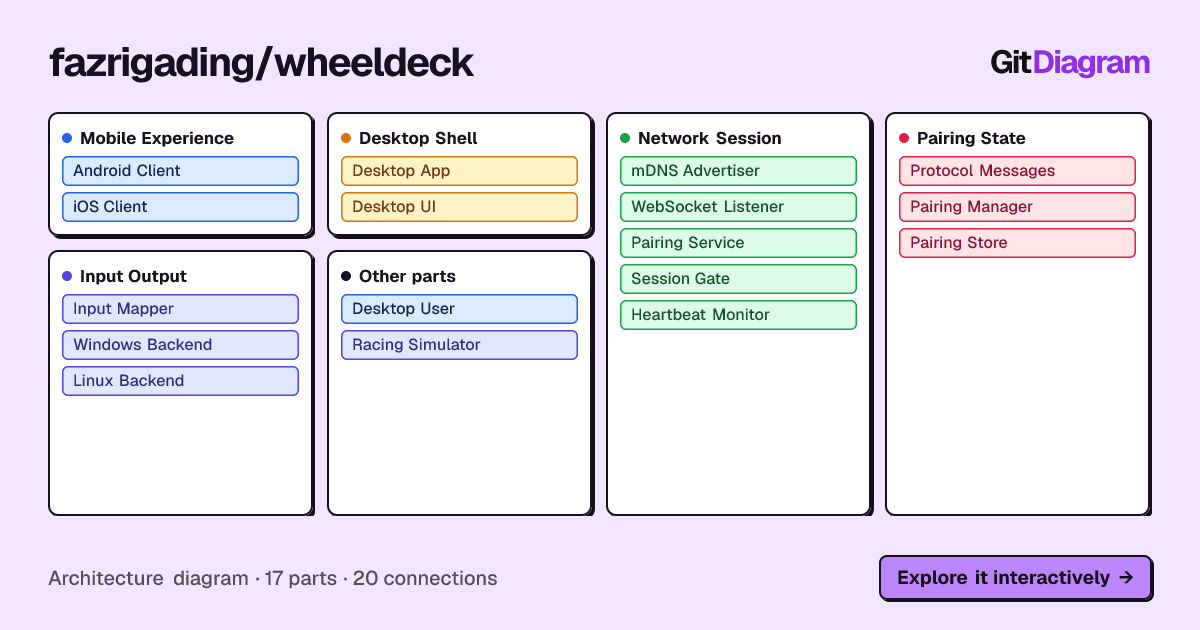
%% Generated by https://gitdiagram.com/fazrigading/wheeldeck
flowchart TD

subgraph group_mobile["Mobile Experience"]
  node_android_client["Android Client<br/>[MainActivity.kt]"]
  node_ios_client["iOS Client"]
end

subgraph group_desktop["Desktop Shell"]
  node_desktop_app["Desktop App<br/>[CompositionRoot.cs]"]
  node_desktop_ui["Desktop UI<br/>[MainWindow.cs]"]
end

subgraph group_network["Network Session"]
  node_mdns["mDNS Advertiser<br/>[MdnsAdvertiser.cs]"]
  node_websocket["WebSocket Listener"]
  node_pairing_service["Pairing Service<br/>[PairingService.cs]"]
  node_session_gate["Session Gate<br/>[SessionGate.cs]"]
  node_heartbeat["Heartbeat Monitor"]
end

subgraph group_pairing["Pairing State"]
  node_protocol["Protocol Messages<br/>[SessionMessages.cs]"]
  node_pairing_manager["Pairing Manager<br/>[PairingManager.cs]"]
  node_pairing_store[("Pairing Store")]
end

subgraph group_output["Input Output"]
  node_input_mapper["Input Mapper<br/>[InputMapper.cs]"]
  node_windows_backend["Windows Backend"]
  node_linux_backend["Linux Backend<br/>[UinputBackend.cs]"]
end

node_desktop_user(("Desktop User"))
node_simulator(("Racing Simulator"))

node_desktop_user -->|"configures"| node_desktop_ui
node_mdns -->|"advertises"| node_android_client
node_mdns -.->|"advertises"| node_ios_client
node_android_client -->|"streams messages"| node_websocket
node_ios_client -.->|"streams messages"| node_websocket
node_websocket -->|"decodes messages"| node_protocol
node_websocket -->|"dispatches pairing"| node_pairing_service
node_websocket -->|"dispatches input"| node_session_gate
node_pairing_service -->|"validates pairing"| node_pairing_manager
node_pairing_manager -->|"reads and writes"| node_pairing_store
node_pairing_service -->|"binds session"| node_session_gate
node_session_gate -->|"checks authorization"| node_pairing_manager
node_session_gate -->|"forwards input"| node_input_mapper
node_session_gate -->|"signals heartbeat"| node_heartbeat
node_input_mapper -.->|"uses backend"| node_windows_backend
node_input_mapper -.->|"uses backend"| node_linux_backend
node_windows_backend -->|"emits controller"| node_simulator
node_linux_backend -->|"emits joystick"| node_simulator
node_desktop_app -->|"starts server"| node_websocket
node_desktop_app -->|"starts discovery"| node_mdns

click node_android_client "https://github.com/fazrigading/wheeldeck/blob/main/mobile/android/app/src/main/kotlin/dev/fazrigading/wheeldeck/MainActivity.kt"
click node_ios_client "https://github.com/fazrigading/wheeldeck/tree/main/mobile"
click node_desktop_app "https://github.com/fazrigading/wheeldeck/blob/main/desktop/WheelDeck.App/CompositionRoot.cs"
click node_desktop_ui "https://github.com/fazrigading/wheeldeck/blob/main/desktop/WheelDeck.App/MainWindow.cs"
click node_mdns "https://github.com/fazrigading/wheeldeck/blob/main/desktop/WheelDeck.Core/Network/MdnsAdvertiser.cs"
click node_websocket "https://github.com/fazrigading/wheeldeck/blob/main/desktop/WheelDeck.Core/Network/WebSocketListener.cs"
click node_pairing_service "https://github.com/fazrigading/wheeldeck/blob/main/desktop/WheelDeck.Core/Network/PairingService.cs"
click node_session_gate "https://github.com/fazrigading/wheeldeck/blob/main/desktop/WheelDeck.Core/Network/SessionGate.cs"
click node_heartbeat "https://github.com/fazrigading/wheeldeck/blob/main/desktop/WheelDeck.Core/Network/HeartbeatMonitor.cs"
click node_protocol "https://github.com/fazrigading/wheeldeck/blob/main/desktop/WheelDeck.Core/Protocol/SessionMessages.cs"
click node_pairing_manager "https://github.com/fazrigading/wheeldeck/blob/main/desktop/WheelDeck.Core/Pairing/PairingManager.cs"
click node_pairing_store "https://github.com/fazrigading/wheeldeck/blob/main/desktop/WheelDeck.Core/Pairing/JsonFilePairingStore.cs"
click node_input_mapper "https://github.com/fazrigading/wheeldeck/blob/main/desktop/WheelDeck.Core/Input/InputMapper.cs"
click node_windows_backend "https://github.com/fazrigading/wheeldeck/blob/main/desktop/WheelDeck.Backends/Windows/HidMaestroBackend.cs"
click node_linux_backend "https://github.com/fazrigading/wheeldeck/blob/main/desktop/WheelDeck.Backends/Linux/UinputBackend.cs"

classDef toneNeutral fill:#f8fafc,stroke:#334155,stroke-width:1.5px,color:#0f172a
classDef toneBlue fill:#dbeafe,stroke:#2563eb,stroke-width:1.5px,color:#172554
classDef toneAmber fill:#fef3c7,stroke:#d97706,stroke-width:1.5px,color:#78350f
classDef toneMint fill:#dcfce7,stroke:#16a34a,stroke-width:1.5px,color:#14532d
classDef toneRose fill:#ffe4e6,stroke:#e11d48,stroke-width:1.5px,color:#881337
classDef toneIndigo fill:#e0e7ff,stroke:#4f46e5,stroke-width:1.5px,color:#312e81
classDef toneTeal fill:#ccfbf1,stroke:#0f766e,stroke-width:1.5px,color:#134e4a
class node_android_client,node_ios_client,node_desktop_user toneBlue
class node_desktop_app,node_desktop_ui toneAmber
class node_mdns,node_websocket,node_pairing_service,node_session_gate,node_heartbeat toneMint
class node_protocol,node_pairing_manager,node_pairing_store toneRose
class node_input_mapper,node_windows_backend,node_linux_backend,node_simulator toneIndigo
- Phone captures gyroscope steering, touch pedals, and dashboard button presses
- Phone discovers the desktop server on the local network via mDNS
- One-time PIN pairing establishes a session
- State and button messages stream over WebSocket in real time
- Desktop app drives a virtual Xbox controller (Windows/HIDMaestro) or joystick (Linux/uinput)
- Simulator reads the virtual controller natively — no game plugins needed
| Directory | Stack | Description |
|---|---|---|
android/ |
Kotlin 2.x + Jetpack Compose | Phone app — sensor capture, WebSocket client, on-screen dashboard |
desktop/ |
C#/.NET 10 + Avalonia UI | Desktop server — WebSocket listener, virtual controller backend, pairing |
protocol/schema/ |
JSON Schema | Shared message formats and control enums (single source of truth) |
- Current:
v0.1.0-alpha.1(tag onmain). GitHub Release is a prerelease with generated notes. - Tag push matching
v*triggers.github/workflows/release.yml: Android APK, Windows x64 zip, Linux x64 tarball. - Android alpha is signed with debug keys (
android/app/build.gradle.kts); real signing lands before stable. - The alpha above predates the Kotlin rewrite: it was cut from the Flutter app. The
Kotlin app in
android/has never been run on a device. The next tag will be the first to ship it, and it should not be called a regression from alpha.
- Done. The native Android app (Kotlin + Jetpack Compose, Material 3, single
:appmodule) replaced the Flutter app, which is deleted. The Dart source is preserved on thebackup/flutter-portbranch. - Plan and per-task acceptance criteria:
plan/finished/migration-kotlin-1.md. What the cutover cost, and what is still unverified:tasks/task-12-leftovers.md. - Seven
TODO.mdMobile items were built as acceptance criteria rather than ported as bugs. Five are shipped; two are implemented but device-unverified. - iOS has no client. The release workflow built a PWA from the Flutter web build, and there is no web target now — it was P2 and never served natively.
See docs/project-structure.md for the full repository layout.
Needs JDK 21 and an Android SDK with platform 37.
cd android
./gradlew installDebugcd desktop
dotnet build
dotnet run --project WheelDeck.AppLinux: run scripts/linux/install-uinput-rules.sh from the repo root, then apply the commands it prints. Covers Fedora/RHEL, Ubuntu/Debian derivatives (Mint, Pop!_OS, Zorin), and Arch-based (CachyOS, Manjaro, EndeavourOS).
See docs/mobile-dev-guide.md and docs/desktop-dev-guide.md for full setup instructions including platform-specific driver requirements.
| Platform | Status | Driver | Virtual controller |
|---|---|---|---|
| Android | P0 | Native | Fully functional |
| Windows | P1 | HIDMaestro | XBOX 360 Controller |
| Linux | P0 | uinput | Virtual Joystick |
Full specs, guides, and architecture decisions: docs/
On-device verification steps for the phone app: tasks/manual-checklist.md.