Visual Zilog Z80 netlist-level simulator



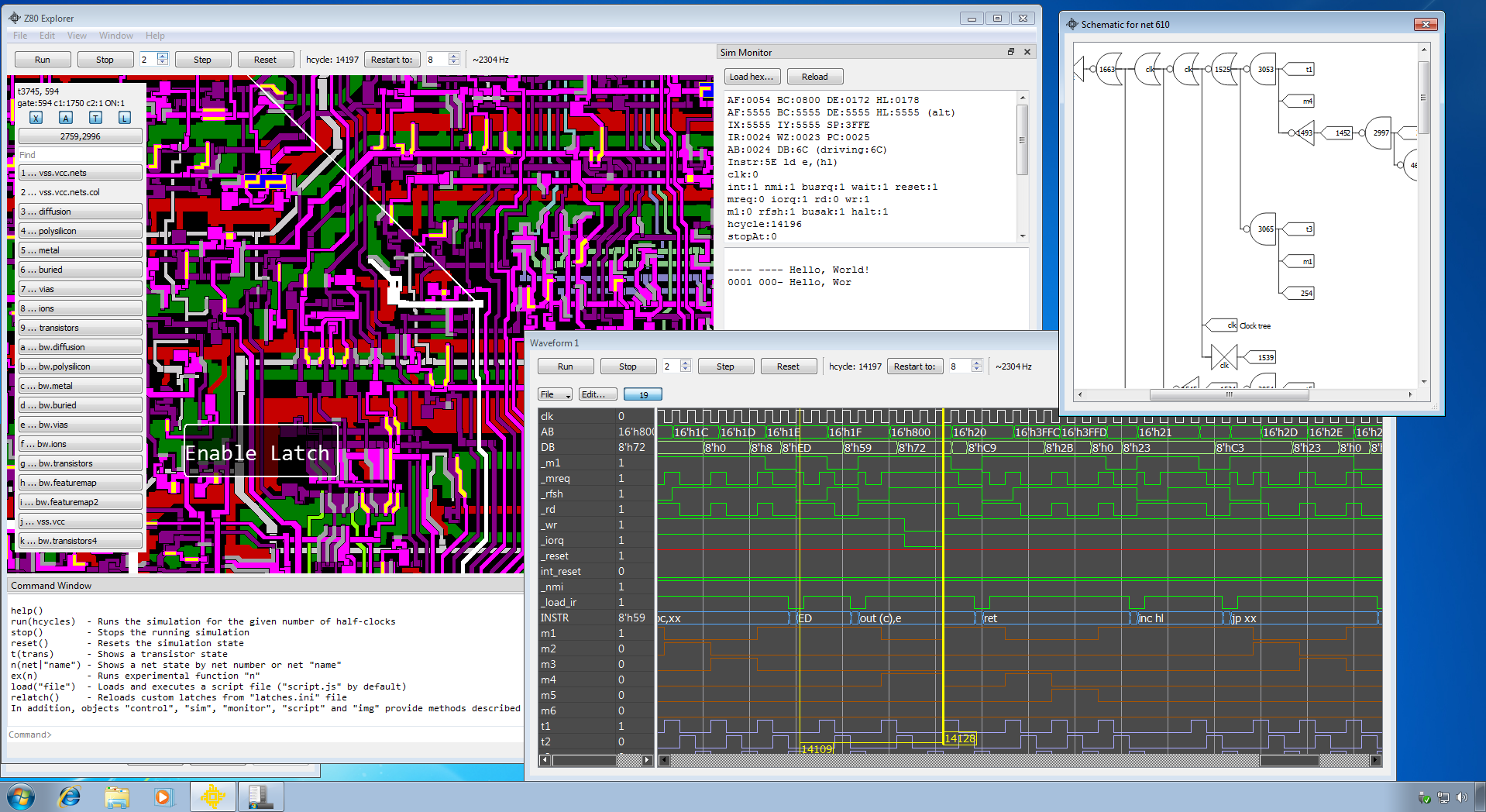
Z80 Explorer is a Zilog Z80 netlist-level simulator capable of running Z80 machine code and an educational tool with features that help reverse engineer and understand this chip better.
- Cycle-accurate simulation of all 8,881 transistors and 3,597 nets in the original Z80 die
- Layered die visualization (diffusion, polysilicon, metal, vias, buried contacts, ions) with click-to-select on any net or transistor
- Waveform capture and replay for arbitrary nets, with cursors, bus decoding, and a circular history buffer
- JavaScript scripting through QJSEngine (
loadHex,run,reset,eq, …) plus drag-and-drop.jsexecution - Built-in MCP HTTP server exposing 30+ tools so LLM clients (Claude Code, etc.) can drive the simulator
- Intel HEX program loading and ZX Spectrum 48K SNA snapshot support;
zexallpasses
Read more in the blog here: Blog
Application's User's Guide: Users Guide
It is also described in a blog: https://baltazarstudios.com/z80explorer
A brief overview is on YouTube: https://youtu.be/_dyngzTEnvw
The annotated overview is on Vimeo: https://vimeo.com/439468449
Launch the app, drag-and-drop resource/tests/hello_world.hex onto the main window (or run loadHex("tests/hello_world.hex") in the Command dock), then reset() followed by run(0). The waveform dock shows live signal traces; clicking any feature on the die identifies its net and current logic state.
Read the User's Guide.
Download from the GitHub releases page. Builds are available for Windows, macOS, and Linux (glibc 2.35+).
Requires Qt 6.9+ and a C++17 compiler. Either build system works: Z80Explorer.pro (qmake) or CMakeLists.txt (CMake). The simplest path is to open one of these in Qt Creator and pick the Release kit.
Windows — Visual Studio 2022 (MSVC, x64) plus the matching Qt kit. AVX2 is enabled automatically.
macOS — Xcode command-line tools (xcode-select --install) plus the macOS Qt kit. AVX2 paths are auto-disabled on Apple Silicon.
Linux — gcc or clang, Qt's Desktop gcc 64-bit component, and the dev libraries below:
sudo apt install build-essential libgl1-mesa-dev libxcb-xinerama0 libxcb-cursor0
Pre-assembled HEX files live in resource/tests/. Drag any of them onto the running app, or load via JS: loadHex("tests/zexall.hex"); reset(); run(0).
Z80Explorer ships a built-in MCP server so an LLM client can drive the simulator: load HEX, run cycles, read nets, sample waveform windows, walk equation trees, and so on. It speaks MCP revision 2026-07-28, the stateless revision: there is no initialize handshake, each request carries its own protocol metadata, and a client learns what the server offers from server/discover. Tools publish output schemas and behaviour hints, so results arrive as validated structured data and a host can tell the read-only tools apart from the ones that move the simulation.
Enable it in Edit → Settings…, tick Enable MCP server, and (optionally) change the port from the default 8765. The server binds to 127.0.0.1 only — the client must run on the same machine, or you need an SSH tunnel. A request carrying a browser Origin that is not this server is refused, which is what keeps a web page from reaching the simulator through DNS rebinding. Confirm it's up:
curl http://localhost:8765/mcp/healthz
The reply names the revision the server speaks, which is the quickest way to check a client is talking the same protocol.
Register it with the Claude Code CLI once (stored in ~/.claude.json, available across all your projects):
claude mcp add --transport http --scope user z80explorer http://localhost:8765/mcp
List the available tools with claude mcp list, or run /mcp inside a Claude Code session to see the live connection state.
The transistor and segment definitions originate with the Visual 6502 team's Z80 reverse-engineering project. This simulator builds on their netlist data with a Qt 6 UI, performance optimizations, scriptable controls, and an MCP surface. Test programs are assembled with zmac.
Creative Commons BY-NC-SA 4.0 — see LICENSE.