Add core concepts section#74
Conversation


|
|
||
| ## How Lightpanda solves it | ||
|
|
||
| Lightpanda drops the graphical rendering engine entirely and rebuilds the rest around automation: JavaScript execution, the DOM, and the Web APIs a script needs. The result is around 9x faster execution and 16x less peak memory than headless Chrome. |

There was a problem hiding this comment.
Link to benchmarks section in docs.
|
|
||
| <Callout type="warning"> | ||
| Lightpanda is fast, so it is easy to send a high volume of requests. Respect | ||
| `robots.txt` and avoid hammering small sites. Pass `--obey-robots` to have |
There was a problem hiding this comment.
This sounds odd. Avoid sending high volume to small sites?
|
|
||
| Lightpanda publishes three benchmarks against headless Chrome: | ||
|
|
||
| - **Crawling at scale**: following every link on a 933-page demo site. |
There was a problem hiding this comment.
Add links to the sub sections in the article here to make it easy to jump to the relevant section

|
|
||
| The agent-oriented modes stack the same engine under different amounts of the browser. With `serve`, your client drives the engine over CDP. With `mcp`, the binary also carries the tool server. With `agent`, it carries the whole loop, so no protocol sits between the model and the engine. | ||
|
|
||
| 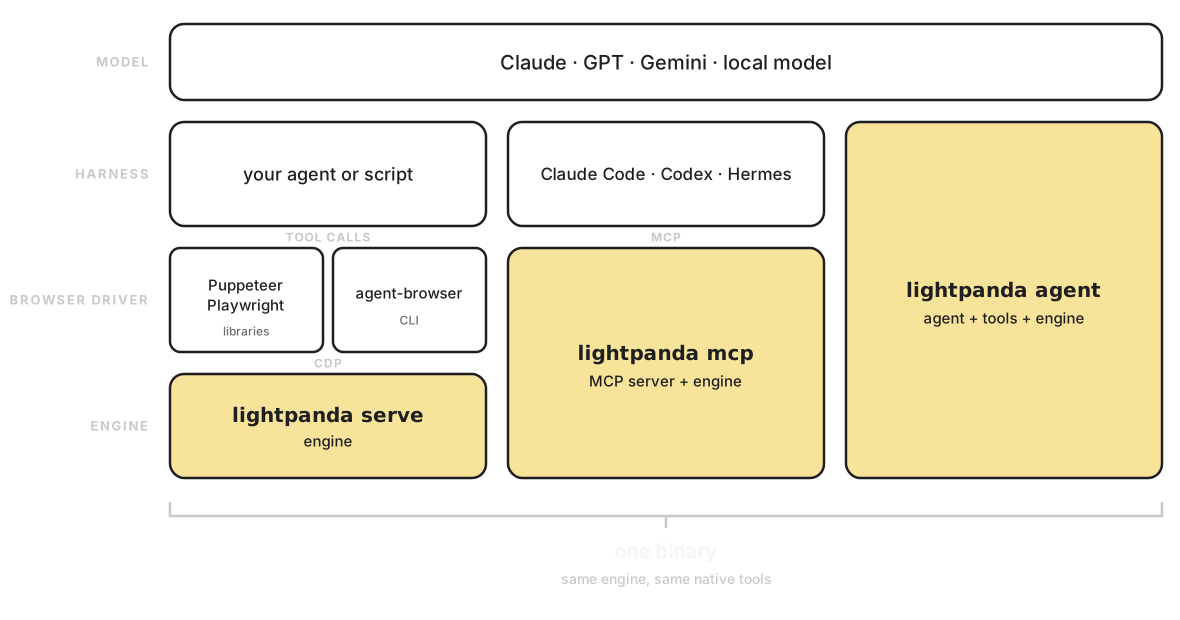 |
There was a problem hiding this comment.
@krichprollsch is it ok to re-use the url of this image that is already in the CDN?

| unit each browser scales with. | ||
| </Callout> | ||
|
|
||
| | Parallel tabs/processes | Lightpanda duration | Lightpanda memory peak | Chrome duration | Chrome memory peak | |
There was a problem hiding this comment.
@krichprollsch add this graph?
more understandable than the table
|
|
||
| The stack, top to bottom: | ||
|
|
||
| ``` |
There was a problem hiding this comment.
@krichprollsch would you find it useful to change this 'text diagram' into an image? how to add the image then?


|
|
||
| ## The problem with Chrome for automation | ||
|
|
||
| Most browser automation today runs on headless Chrome, through tools like Puppeteer or Playwright. Headless Chrome still computes graphical output, even though nothing renders it to a screen. Running hundreds or thousands of instances is heavy on RAM and CPU, and instances need frequent restarts to stay stable. That overhead exists because Chrome was built for a human sitting in front of a monitor, not for a script driving it at scale. |
There was a problem hiding this comment.
I think we could also say something about CDP's inefficiency with a link to https://4083bc9b.website-5jk.pages.dev/blog/posts/cdp-under-the-hood#example-2-the-coordinate-problem
|
|
||
| - **CDP**: [Puppeteer](https://pptr.dev/), [Playwright](https://playwright.dev/), and [Chromedp](https://github.com/chromedp/chromedp) connect to it the same way they connect to Chrome. Point the client at Lightpanda's endpoint and keep your existing scripts. | ||
| - **MCP**: control the browser from AI applications over the [Model Context Protocol](https://modelcontextprotocol.io). | ||
| - **HTTP API**: retrieve results directly over HTTP, without writing or running a CDP script. |
There was a problem hiding this comment.
it's only in cloud env, should we point that?
|
|
||
| <Callout type="info"> | ||
| Because Lightpanda does not render, it does not compute visual layout. APIs | ||
| that depend on pixel geometry (for example element bounding boxes) return |
There was a problem hiding this comment.
Not exactly, we have kind of bounding boxes emulation, see https://4083bc9b.website-5jk.pages.dev/blog/posts/cdp-under-the-hood#how-we-handle-coordinates-in-lightpanda
But is has been improved, and now we take care of box visibility, CSS and HTML attributes to compute the element size. https://github.com/lightpanda-io/browser/blob/main/src/browser/webapi/Element.zig#L1249-L1280
So I wouldn't say it's a best effort value, but a fair approximation :)
What we really simulate and which is far for reality is box positioning https://github.com/lightpanda-io/browser/blob/main/src/browser/webapi/Element.zig#L1459-L1503
| | `src/browser/` | Browser, Session, Page, Frame | | ||
| | `src/browser/js/` | The Browser's JavaScript engine, a V8 isolate (thin wrappers over the V8 C++ API) | | ||
| | `src/browser/webapi/` | Inside each Page and Frame: the Web APIs and the DOM | | ||
| | `src/browser/parser/` | Inside each Page and Frame: the HTML parser (html5ever, Rust) | |
There was a problem hiding this comment.
Not sure it's relevant/useful
| - [`serve`](/run-locally/commands/serve) starts a WebSocket CDP server. Clients like [Puppeteer](/usage/cdp/puppeteer), [Playwright](/usage/cdp/playwright), and [chromedp](/usage/cdp/chromedp) connect over the Chrome DevTools Protocol on port `9222` by default. This is the mode most automation uses. | ||
| - [`fetch`](/run-locally/commands/fetch) loads one or more URLs and dumps the result to stdout as HTML or Markdown. It is a one-shot command with no server. | ||
| - [`agent`](/usage/agent) starts an interactive AI agent that browses the web from natural language and can record reproducible scripts. | ||
| - [`mcp`](/usage/mcp) starts a Model Context Protocol server over stdio, so an LLM host can use the browser as a tool. |
There was a problem hiding this comment.
it can be over HTTP also now.
|
|
||
| **JavaScript engine.** Lightpanda runs page scripts on V8 and does not reimplement JavaScript. The Zig code in `src/browser/js/` is a thin wrapper around V8's C++ API: isolates, contexts, values, promises, and modules. The Web API objects that scripts touch are implemented in Zig, so `document`, `window`, and `fetch` are backed by native code, not more JavaScript. Startup is fast because of a V8 startup snapshot: a serialized, pre-initialized V8 heap embedded in the binary at build time. On each start V8 loads it instead of rebuilding its built-in objects from scratch, which removes most of the isolate warm-up cost. | ||
|
|
||
| **Web APIs and the DOM.** These are implemented natively in Zig, grouped by area: the DOM (`Document`, `Element`, `Node`), events, `fetch` and networking, `Crypto`, observers (mutation, intersection, resize), and storage. Coverage is partial and grows over time. Lightpanda implements the APIs headless automation exercises, not the entire web platform. The source of truth for what exists is `src/browser/webapi/` in the browser repository. When a script calls one of these APIs it runs compiled Zig, which is why DOM-heavy pages stay cheap in both time and memory. |
There was a problem hiding this comment.
What about linking https://perf.lightpanda.io/wpt to illustrate the coverage?
| Lightpanda follow `robots.txt` for you. | ||
| </Callout> | ||
|
|
||
| ## Memory model |
There was a problem hiding this comment.
Not sure about the praragraph.
3 participants


Adds a new "Core concepts" section with four explanation pages:
Registers the new section and pages in
_meta.ts.