!3 (spoken not three, derived from the leet speak word not3) is a simple paste sharing platform similar to other solutions like hastebin or pastebin.
!3 is focused on simplicity, security by client side encryption and usage of the monaco editor.
- Simple paste sharing
- Client side encryption
- Monaco editor
- Syntax highlighting
- Dark mode
- File transfers
- Connect your private instance with the public UI
- New: Excalidraw integration
- Planned: Peer 2 Peer sessions
- Planned: Note Bundles
- Planned: HTML Previewer
- Planned: JavaScript Console
- No cookies
- No tracking
- No ads
We also provide a cli tool to interact with the API.
npm install -g @not3/cli$ not3 --help
The !3 command line interface, pipe logs or upload files in a jiffy.
VERSION
@not3/cli/3.0.0 linux-x64 node-v22.19.0
USAGE
$ not3 [COMMAND]
TOPICS
config Manage the global not3 config file
crypto Local encryption utilities
file Upload and download encrypted files
note Save and fetch encrypted notes
server Server information and statistics
COMMANDS
d Download and decrypt a file
g Fetch and decrypt a note from the server
s Encrypt and save a note on the server
u Encrypt and upload a file
license Show the license of this tool and all bundled dependencies
Or use it with docker:
docker run --rm -it -v "$(pwd):/data" ghcr.io/not-three/cli --helpExamples:
not3 note save "hello world"          # save a note (alias: not3 s)
journalctl -u app | not3 s            # pipe logs, get a share url on stdout
not3 note get <id>                    # fetch + decrypt (alias: not3 g)
not3 file upload video.mp4            # upload a file (alias: not3 u)
not3 file download <id> out.mp4       # download a file (alias: not3 d)
not3 crypto encrypt -f x.txt -o x.enc # local encryption
not3 config set server https://my.api # global defaults (~/.config/not3/config.json)
not3 config set password hunter2      # bound to the server above, never sent elsewhere
$ not3 u --dir src/
Zipping src/...
Uploading [====================] 1/1
▄▄▄▄▄▄▄▄▄▄▄▄▄▄▄▄▄▄▄▄▄▄▄▄▄▄▄▄▄▄▄▄▄▄▄▄▄▄▄
█ ▄▄▄▄▄ █▄▀▀▀██▀█ █▄█▄ ▀██▄█ █ ▄▄▄▄▄ █
█ █ █ █ ▀ █▄ █ ▀▀▀██▀██ ▄▄▄█ █ █ █
█ █▄▄▄█ █▄██▄▄ ▄▄▄▄ ▀▄█▄▄ ▄ █ █▄▄▄█ █
█▄▄▄▄▄▄▄█▄█ █▄█▄█▄▀▄█ █▄█ █▄▀▄█▄▄▄▄▄▄▄█
█▄ ▄▀▀▄█▄▀▄▄█▀▀▀▀█▄▄ █▀██▀▀█▀▄█▀▄ ▀▄█
█ ▄▄██▄▄ ▀ █▀ ▀▄█▀▀▄▄▀ ▄▀▄▀██▀▄▀█ ▀█
█ ▀▄▀▄▄ █▄▀ ▄ ▀▀ ▄▄ ██ ▀▀▀ █ █ █
█▀▄▄▄ ▄ ▄ ▄███▀███▄▄▄ ▄█ ▄▀▀▄ ▄▀█ █▄▀█
█▄▄ █▀▀▄█▄▀▀ ▀▀█▄▀▀▀▀█▄█ ▀█ █▀███▀▄ ▀█
█ ▄ ▀ ▀▄█▄ ▀▀█ ▄▀▀ █▄▄▀█▄█▄ ▀███ ▀▄ ▄█
█▀ ▀█▀▄▄█ █▄ ▀▀▄█▄▀ ██ ▄ ▀▀▄█▀ ██
█ █ ▄▀▄█ ▄▀▄▄ ▀█████▄██▄▄▀███▄██▀▀ ███
██▀▄ ▄▄▄█▀▄▄█ ▀▀▀█▄▄▄██ ▀ ▄█ ▄ █
█▀▄▀▄▄▄▄ ▀▀▄█ ▄▄▀▀▄█ █ █▀▀▄ ▀█ ▄▄▀▄█▄▀█
███▄█▄▄▄▄ ▄ ▀ ██ █▀▄▄▀▀ ▀ ██▀ ▄▄▄ ▄ █
█ ▄▄▄▄▄ ██▄ ▀██ ▄ ██▀█▀▀██ █▄█ ▄█ █
█ █ █ █▀ █▄█▄ ▀▀█▄ ▀▀▀█ ▄▀▄ ▄ █▀█▄█
█ █▄▄▄█ █ ▄ ▀ ▄█▄███▄█▄ ▄ ▀█▄ ▄ ▄ ▀███
█▄▄▄▄▄▄▄█▄█▄▄▄▄▄█████▄███▄▄███▄▄▄██▄▄▄█
ID YPOehQtnhnrku-8iEt-LO
Seed ccqORVQCQJSjsDD1BO4IOvJtLJgSId2jodMiKFr2jks=
URL https://not-th.re/f/YPOehQtnhnrku-8iEt-LO#az1jY3FPUlZRQ1FKU2pzREQxQk80SU92SnRMSmdTSWQyam9kTWlLRnIyamtzJTNE
cURL curl https://raw.githubusercontent.com/not-three/main/refs/heads/main/scripts/decrypt-file.sh | bash -s https://api.not-th.re/file/YPOehQtnhnrku-8iEt-LO ccqORVQCQJSjsDD1BO4IOvJtLJgSId2jodMiKFr2jks= src.zip
The simplest way to use !3 is to visit our hosted instance at https://not-th.re.
Because this project relies on the Web Crypto API (crypto.subtle) for client-side encryption, the UI MUST be deployed using SSL/HTTPS. Browsers do not provide access to the crypto.subtle interface if the site is not served in a secure context.
- UI: HTTPS is mandatory; the application will not function without it.
- API: While the API can theoretically be deployed without SSL, it is strongly disadvised.
- Configuration: The deployment examples provided in this documentation do not include SSL configuration. Users are expected to configure this on their own.
For those using Traefik as a reverse proxy, we recommend referring to the Traefik Let's Encrypt documentation for automated certificate management.
The micro deployment does not bring its own UI, but you can use the public UI.
services:
  api:
    image: ghcr.io/not-three/api:latest
    restart: unless-stopped
    environment:
      CORS_ENABLED: true
      LIMITS_DISABLED: true
      INSTANCE_PASSWORD: MySecretPassword
    ports:
      - 4000:4000
    volumes:
      - db:/data/db

volumes:
  db:
After you have deployed the API, visit the public UI
go to Tools -> Edit Settings and update these values:
{
  "customServer": {
    "url": "http://<ip-of-the-server>:4000/",
    "password": "MySecretPassword"
  }
}
Dont forget to save the settings, by clicking on File -> Save (or by pressing ctrl + s).
💡 Note: If you're using your own private instance and share a URL, the encrypted link will include both the encryption key and the address of your private server. When someone opens the link and they haven't set your server as their primary one, they'll be notified and asked to confirm access to data from an external server. If they agree, the data will then be loaded securely from your instance.
The minimal deployment includes the API and the UIs. The UI has the proxy mode enabled, so you only need a single port.
x-restart: &restart
  restart: unless-stopped

services:
  api:
    image: ghcr.io/not-three/api:latest
    <<: *restart
    volumes:
      - db:/data/db

  draw:
    image: ghcr.io/not-three/draw:latest
    <<: *restart

  ui:
    image: ghcr.io/not-three/ui:latest
    <<: *restart
    ports:
      - 4000:4000
    depends_on:
      - api
      - draw
    environment:
      PROXY_URL: http://api:3000
      DRAW_PROXY_URL: http://draw:80

volumes:
db:An simple deployment, including a postgres database instead of sqlite. Recommended if you want to store more than a few pastes.
x-restart: &restart
  restart: unless-stopped

services:
  api:
    image: ghcr.io/not-three/api:latest
    <<: *restart
    depends_on:
      - db
    ports:
      - 3000:3000
    environment:
      CORS_ENABLED: true
      CORS_ORIGIN: http://localhost:4000
      DATABASE_MODE: pg
      DATABASE_HOST: db
      DATABASE_USERNAME: db
      DATABASE_PASSWORD: db
      DATABASE_NAME: db

  draw:
    image: ghcr.io/not-three/draw:latest
    <<: *restart
    ports:
      - 4500:80

  ui:
    image: ghcr.io/not-three/ui:latest
    <<: *restart
    ports:
      - 4000:4000
    environment:
      API_URL: http://localhost:3000
      DRAW_URL: http://localhost:4500
      TERMS_OF_SERVICE_URL: https://example.com

  db:
    image: postgres:14.5
    <<: *restart
    environment:
      POSTGRES_PASSWORD: db
      POSTGRES_USER: db
      POSTGRES_DB: db
    volumes:
      - db:/var/lib/postgresql/data

volumes:
db:The api optionally integrates with valkey (or any
redis-compatible server). Set VALKEY_ENABLED=true to store the internal
cache in valkey instead of memory, so it is shared between all instances
and survives restarts. Recommended as soon as you run more than one api
instance (the advanced examples below do this).
Additionally, DATABASE_REQUEST_OPTIMIZATION can reduce database traffic so
serverless databases (e.g. neon.tech) can go to sleep
while the instance is idle:
none(default): no optimization. Short cache lifetimes (~30 seconds) and cleanup schedulers running every minute keep the database in constant use.light: longer cache lifetimes, cleanup schedulers run every 15 minutes instead of every minute.hard(requires valkey): additionally keeps rate limit tracking in valkey and buffers new notes in valkey, writing them to the database in batches (seeVALKEY_FLUSH_INTERVAL_SECONDS/VALKEY_FLUSH_MAX_QUEUE_SIZE). Enable valkey persistence (AOF) so buffered notes survive a valkey restart.
x-restart: &restart
  restart: unless-stopped

services:
  api:
    image: ghcr.io/not-three/api:latest
    <<: *restart
    depends_on:
      - valkey
    ports:
      - 4000:4000
    environment:
      CORS_ENABLED: true
      DATABASE_MODE: pg
      DATABASE_HOST: your-serverless-postgres.example.com
      DATABASE_USERNAME: db
      DATABASE_PASSWORD: db
      DATABASE_NAME: db
      DATABASE_REQUEST_OPTIMIZATION: hard
      VALKEY_ENABLED: true
      VALKEY_HOST: valkey

  valkey:
    image: valkey/valkey:8
    <<: *restart
    command: valkey-server --appendonly yes
    volumes:
      - valkey:/data

volumes:
valkey:See one of the following files for a more detailed example:
- compose.yml — single docker host, scaled via compose
deploy.replicas(no swarm needed) - compose.swarm.yml — docker swarm cluster
These include horizontal scaling, health checks, valkey as a shared cache and traefik as a reverse proxy.
For a full list, with detailed descriptions of all environment variables, see the configuration documentation.
As of now, we do not have an official helm chart, if you want to contribute one, feel free to open a PR.
In some scenarios, you might want to deploy the static site without a backend, for example not-th.re is deployed with Cloudflare Pages, while the API is hosted on api.not-th.re.
The static site can then be configured by editing the config.json file.
{ "baseURL": "https://api.not-th.re/", "drawURL": "https://draw.not-th.re/", "termsURL": "https://scolasti.co/go/privacy" }You can download the client bundle from one of the following sources:
All stable versions of the client are available as a github release artifact.


docker run --rm --entrypoint /bin/sh -v $(pwd):/mnt ghcr.io/not-three/ui:latest -c "cp -r /app/public/ /mnt/ui/"

docker run --rm --entrypoint /bin/sh -v $(pwd):/mnt ghcr.io/not-three/draw:latest -c "cp -r /usr/local/apache2/htdocs/ /mnt/draw/"
This will copy the public folder to your current working directory.
The nightly (unstable) versions of the client are also available as a github action artifacts.


| Version | @not3/sdk@v1 | @not3/sdk@v2 | @not3/sdk@v3 | @not3/sdk@v4 | ... |
|---|---|---|---|---|---|
| main | 🟢 | 🔴 | ⚪ | ⚪ | ... |
| api | 🔴 | v2 | ⚪ | ⚪ | ... |
| ui | 🔴 | v2 | ⚪ | ⚪ | ... |
| cli | 🔴 | v2-3 | ⚪ | ⚪ | ... |
This project is licensed under the GNU Affero General Public License v3.0.
GNU AGPLv3
Permissions of this strongest copyleft license are conditioned on making available complete source code of licensed works and modifications, which include larger works using a licensed work, under the same license. Copyright and license notices must be preserved. Contributors provide an express grant of patent rights. When a modified version is used to provide a service over a network, the complete source code of the modified version must be made available.
| Permissions | Conditions | Limitations |
|---|---|---|
🟢 Commercial useThe licensed material and derivatives may be used for commercial purposes. |
🔵 Disclose sourceSource code must be made available when the licensed material is distributed. |
🔴 LiabilityThis license includes a limitation of liability. |
🟢 DistributionThe licensed material may be distributed. |
🔵 License and copyright noticeA copy of the license and copyright notice must be included with the licensed material. |
🔴 WarrantyThis license explicitly states that it does NOT provide any warranty. |
🟢 ModificationThe licensed material may be modified. |
🔵 Network use is distributionUsers who interact with the licensed material via network are given the right to receive a copy of the source code. |
|
🟢 Patent useThis license provides an express grant of patent rights from contributors. |
🔵 Same licenseModifications must be released under the same license when distributing the licensed material. In some cases a similar or related license may be used. |
|
🟢 Private useThe licensed material may be used and modified in private. |
🔵 State changesChanges made to the licensed material must be documented. |
Information provided by https://choosealicense.com/licenses/agpl-3.0/
This information is provided for general understanding and is not legal advice.
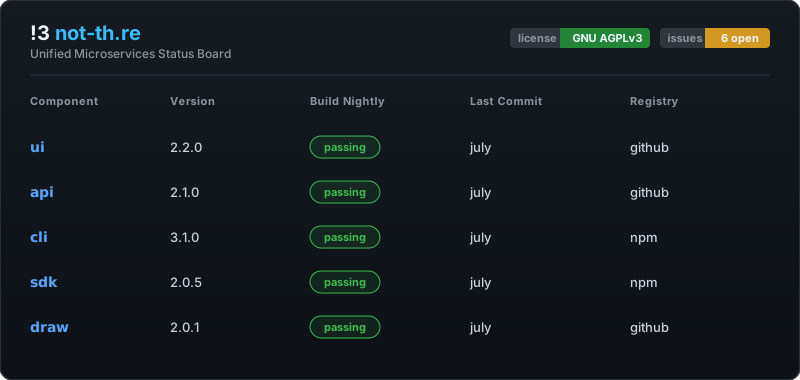
The !3 project is open source and welcomes contributions. It is structured across multiple repositories, each serving a specific purpose:
- main - Contains deployment documentation, shell scripts, and overall project setup.
- ui - The web interface for !3, built with Nuxt (Vue) and TypeScript.
- api - The backend API, written in TypeScript using the NestJS framework.
- cli - Command-line interface for !3, built with TypeScript and the NestJS commander framework.
- sdk - A TypeScript SDK usable in both browser and Node.js environments.
- draw - A wrapper for Excalidraw using React and TypeScript, used for visual/paste sharing.
Note: The main repository is the central place for reporting bugs, submitting suggestions, and discussing ideas. It is the only repository in the organization with issues enabled.
The project is licensed under the GNU Affero General Public License (AGPL). If you contribute to this project:
- Your contributions will be automatically licensed under the AGPL.
- If you later reuse your contributions in another project or deploy a modified version of the software, you are responsible for complying with the AGPL's terms.
- In particular, if you make the software available over a network (e.g., by hosting it), you are legally required to provide the corresponding source code to users of your deployment.
By contributing, you acknowledge and accept these terms. If in doubt, seek legal advice before submitting a contribution.